Homelab & Self-Hosting

One idea. One server. Quite a few containers.

What started as a simple network-wide ad-blocker grew into a small self-hosted ecosystem for privacy, storage, media, automation and monitoring.

From Raspberry Pi to mini PC

It started with a simple idea: block ads across my home network.

The original plan was to install Pi-hole on a Raspberry Pi and leave it running quietly somewhere next to the router. After looking into the available hardware, however, a Raspberry Pi no longer seemed like the small and inexpensive solution it once was. It was relatively expensive, limited in performance and left little room for whatever might come next.

So the Raspberry Pi became a mini PC.

Meet lab01

lab01 is a small Ubuntu server that runs continuously in my home network. Most of its services are deployed as Docker containers, allowing applications to remain separated, portable and relatively easy to maintain.

Processor AMD Ryzen 3 4300U
Memory 16 GB RAM
Storage 512 GB SSD
Software Ubuntu 24.04 LTS
Docker & Docker Compose

What started as a network-wide ad-blocker gradually became a platform for private cloud storage, password management, photo organisation, media streaming, home automation and system monitoring.

The server itself handles the applications and databases, while larger media collections and backups are stored separately on a Synology DS218play NAS. This keeps the system flexible and makes it easier to expand storage without moving the entire setup.
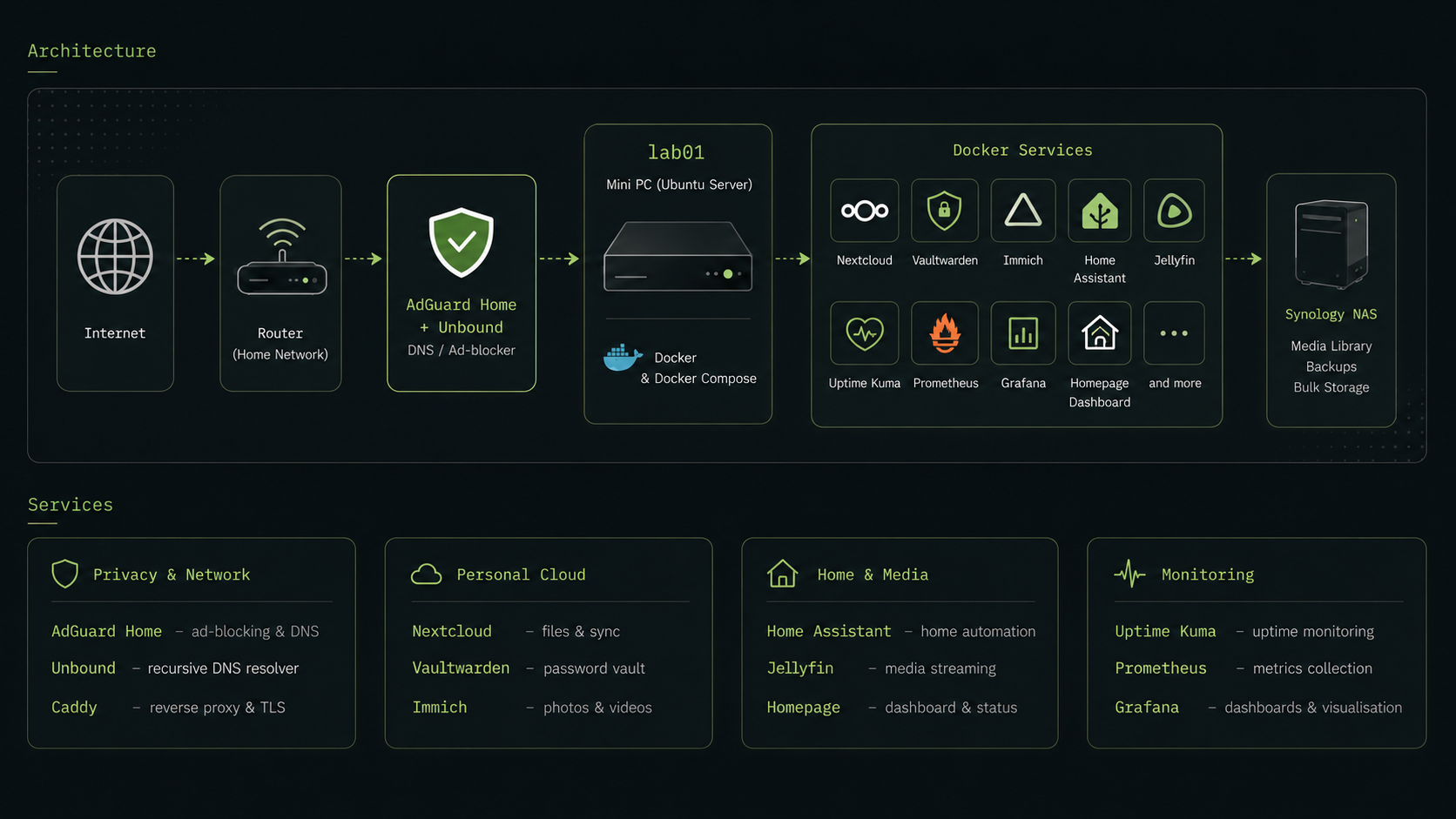
Diagram of the lab01 homelab architecture, showing the internet connection, router, AdGuard Home and Unbound, the lab01 mini PC, Docker services and the Synology NAS.
A simplified view of the setup. Internal addresses, ports and access details are intentionally left out.

What runs on it

Privacy & Network

  • AdGuard Home Filters ads, tracking and unwanted domains for devices across the network.
  • Unbound Handles local recursive DNS resolution together with AdGuard Home.
  • Caddy Acts as a reverse proxy and handles secure browser connections.

Personal Cloud

  • Nextcloud Provides private file storage and synchronisation across devices.
  • Vaultwarden Hosts my password vault without relying on a third-party cloud provider.
  • Immich Organises and backs up photos and videos while keeping the files under my own control.

Home & Media

  • Home Assistant Connects and automates devices around the home.
  • Jellyfin Makes locally stored media available across different devices.

Monitoring

  • Uptime Kuma Checks whether important services are available.
  • Prometheus & Grafana Collect system metrics and turn them into dashboards and visualisations.
  • Homepage Provides quick access to services and shows their current status.

More than running containers

Self-hosting is not only about installing applications. It also means taking responsibility for updates, backups, security, storage and recovery when something stops working.

The setup therefore includes automated backups, service monitoring and regular maintenance. Some of the most useful lessons have come from the moments when a database did not start, a network share disappeared or a container update behaved differently than expected.

Why self-host?

For me, self-hosting is a mixture of privacy, independence and curiosity.

It gives me more control over where my data is stored and how services work. At the same time, it creates a practical environment for learning about Linux, Docker, networking, DNS, databases and automation.

lab01 was never planned as a complete system. It grew one problem, one experiment and one container at a time.

And it is still growing.